 Myfxbook
 How to purchase and update products?
 FAQ – Frequently Asked Questions & Important Information at TopEAstore.com
 VPS
VPS DOWNLOADS
 My account


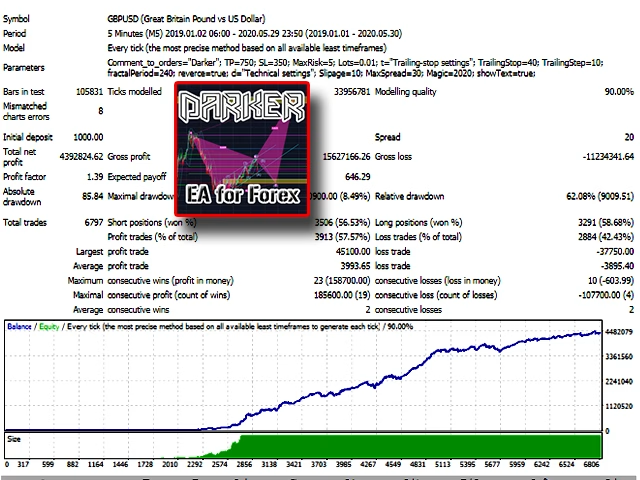


Darker EA MT4 Unlimited

$20
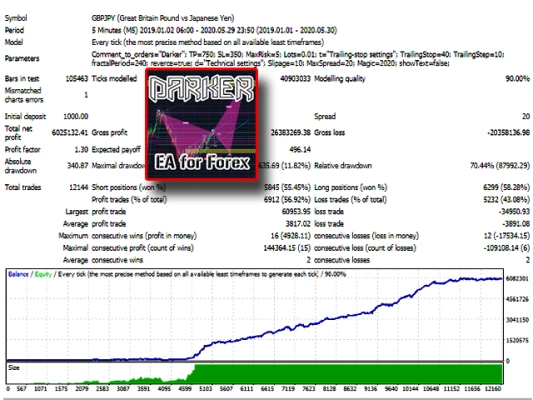
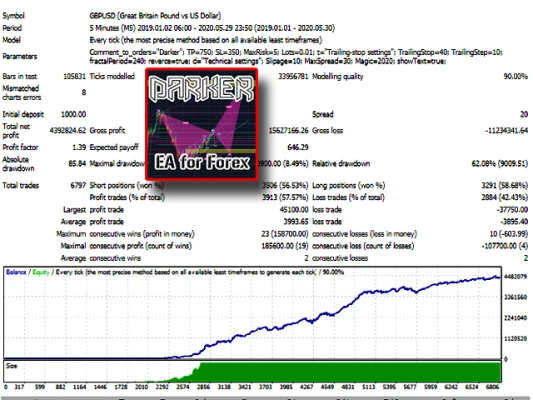
Darker EA MT4 is a fully automated Forex trading robot designed for traders who value stability, discipline, and simplicity. With a non-linear entry algorithm, mandatory risk control, and smart spread filtering, Darker EA delivers consistent performance without over-optimization or manual intervention.
Instant Digital Delivery
Receive your product instantly via email right after purchase.
Unlimited Version
All products sold on our website are full, unlimited-use versions.
Free Updates
Any new versions we receive will be automatically added to your account.
All-Inclusive Pricing
No hidden fees—what you see is what you pay.
Darker EA MT4 – A Professional Automated Trading Solution for Stable Forex Performance
Contents
- 0.1 Darker EA MT4 – A Professional Automated Trading Solution for Stable Forex Performance
- 0.2 Professional Overview of Darker EA MT4
- 0.3 Smart Trading Logic & Risk Management
- 0.4 Recommended Trading Instruments & Timeframe
- 0.5 Minimal Settings – Maximum Efficiency
- 0.6 VPS Recommended for Stable Operation
- 0.7 How to Start Using Darker EA MT4
- 0.8 Who Should Use Darker EA MT4?
- 0.9 Final Thoughts from a Professional Trader
- 0.10 📥 Instant Delivery & Lifetime Access
- 1 -35%
Darker EA MT4.zip
Professional Overview of Darker EA MT4
Darker EA MT4 is an advanced Expert Advisor built for MetaTrader 4, developed with a focus on risk control, precision entries, and long-term stability. Unlike aggressive grid or martingale systems, Darker EA does not increase lot size to recover losses, making it a safer choice for professional traders.
The EA uses a unique non-linear formula to calculate market entry points and a proprietary algorithm to lock in results. Every trade is protected by mandatory Stop Loss and Take Profit levels, ensuring disciplined trade management in all market conditions.
Smart Trading Logic & Risk Management
Darker EA operates with a conservative and professional approach:
- No martingale or grid strategies
- Fixed Stop Loss and Take Profit on every trade
- Automatic lot calculation based on risk percentage
- Optional trailing stop for profit protection
The EA includes a spread control system that monitors broker behavior in real time. If spreads widen beyond acceptable levels, Darker EA will pause trading until market conditions normalize — a critical feature for avoiding unnecessary losses during volatile periods.
Recommended Trading Instruments & Timeframe
For optimal performance, Darker EA MT4 is designed to trade on the M5 timeframe with default broker settings.
Best Currency Pairs:
- GBPUSD
- GBPJPY
- EURUSD
- EURGBP
- EURJPY
These pairs provide the liquidity and volatility profile required for the EA’s internal logic to perform efficiently.
Minimal Settings – Maximum Efficiency
One of the biggest advantages of Darker EA MT4 is its simplicity. The EA does not require optimization, custom .set files, or constant trader supervision.
Key Input Parameters:
- Comment to Order
- Take Profit
- Stop Loss
- MaxRisk (automatic lot calculation)
- Trailing Stop (start & step)
- Fractal Period
- Trend or Counter-Trend Mode
- Max Slippage
- Max Spread
- Magic Number
- Info Panel Display
This streamlined configuration makes Darker EA suitable for both experienced traders and those who prefer a hands-off automated system.
VPS Recommended for Stable Operation
To ensure uninterrupted performance, Darker EA MT4 should be installed on a VPS (Virtual Private Server). This guarantees:
- 24/5 trading uptime
- Faster order execution
- Protection against power or internet failures
Professional traders understand that VPS hosting is essential for any serious automated strategy.
How to Start Using Darker EA MT4
- Install MetaTrader 4 on your VPS
- Add Darker EA to the MT4 terminal
- Open M5 charts for all recommended currency pairs
- Attach the EA to each chart
- Enable auto-trading and allow live trading
- Use default settings or adjust risk parameters if needed
That’s it — Darker EA will handle the rest.
Who Should Use Darker EA MT4?
Darker EA MT4 is ideal for:
- Traders seeking stable, rule-based automation
- Investors who avoid high-risk recovery systems
- Users who prefer minimal settings and no optimization
- Anyone looking for a professional EA with disciplined risk management
Final Thoughts from a Professional Trader
Darker EA MT4 stands out as a clean, conservative, and well-structured trading robot. It doesn’t promise unrealistic profits — instead, it focuses on consistency, safety, and automation done right. For traders who value control over chaos, Darker EA MT4 is a solid addition to any Forex portfolio.
📥 Instant Delivery & Lifetime Access
After purchase, download instantly here:
👉 https://topeastore.com/my-account/downloads/
Your question is already answered in our FAQ here:
👉 https://topeastore.com/faq/
Related products
-78%


EXPERT ADVISOR
Original price was: $900.$200Current price is: $200.

EXPERT ADVISOR
$15

EXPERT ADVISOR
$20

EXPERT ADVISOR
$20


EXPERT ADVISOR
$20

EXPERT ADVISOR
$20


EXPERT ADVISOR
$20

EXPERT ADVISOR
$10