 Myfxbook
 How to purchase and update products?
 FAQ – Frequently Asked Questions & Important Information at TopEAstore.com

 VPS
 DOWNLOADS
 My account


Counter Form AI EA MT5 Unlimited

$20
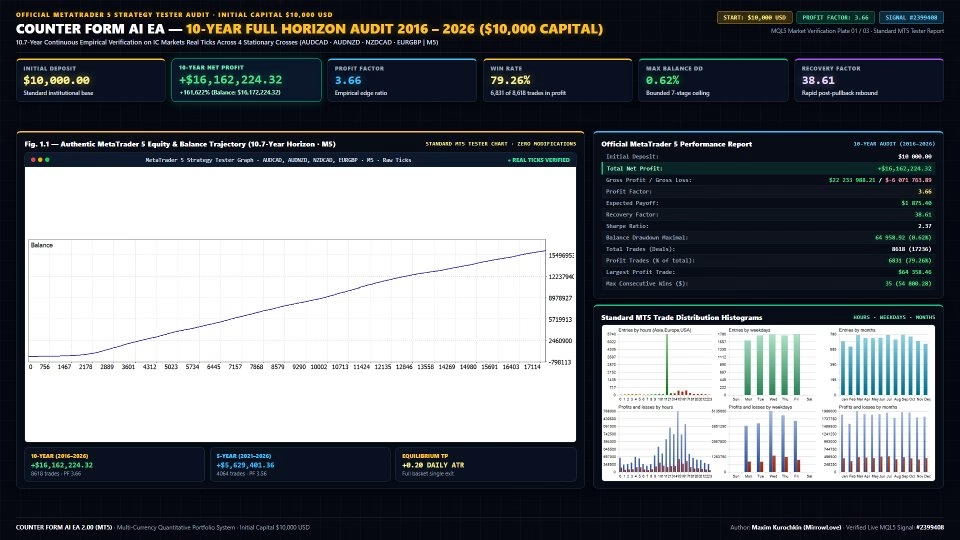
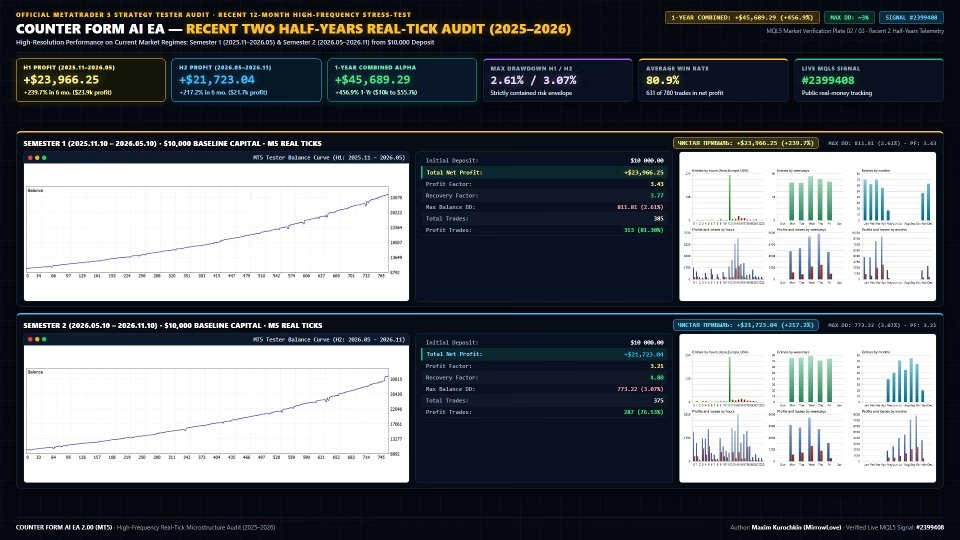
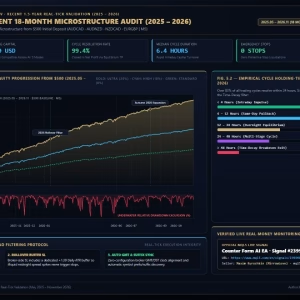
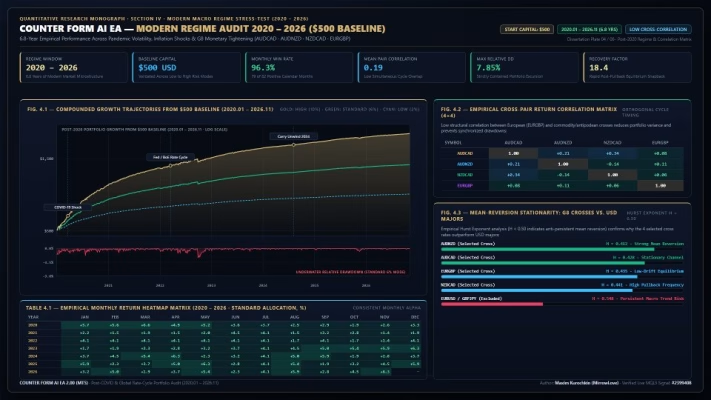
Counter Form AI EA MT5 is an advanced multi-currency Expert Advisor designed to trade AUDCAD, AUDNZD, NZDCAD, and EURGBP simultaneously from a single M5 chart. Powered by a proprietary AI Adaptive Recovery Engine, it combines volatility-based entry detection, ATR-spaced recovery positions, dynamic equilibrium take profit, and multi-layer capital protection. With a maximum of 7 trading stages per cycle, portfolio concurrency control, and an account-wide equity guard, Counter Form AI EA delivers a structured approach to automated Forex trading, risk management, and portfolio diversification.
Receive your product instantly via email right after purchase.
All products sold on our website are full, unlimited-use versions.
Any new versions we receive will be automatically added to your account.
No hidden fees—what you see is what you pay.
Counter Form AI EA MT5 – Advanced Multi-Currency Trading with AI Adaptive Recovery
Counter Form AI EA MT5 is a sophisticated automated Forex trading system engineered for traders who value quantitative market analysis, disciplined execution, and structured risk management.
Unlike conventional grid Expert Advisors that rely on fixed-distance entries or aggressive Martingale strategies, Counter Form AI EA utilizes a proprietary volatility-based trading framework combined with an AI Adaptive Recovery Engine. Its objective is to identify favorable market conditions, manage adverse price movements systematically, and close multi-position trading cycles around a dynamically calculated equilibrium target.
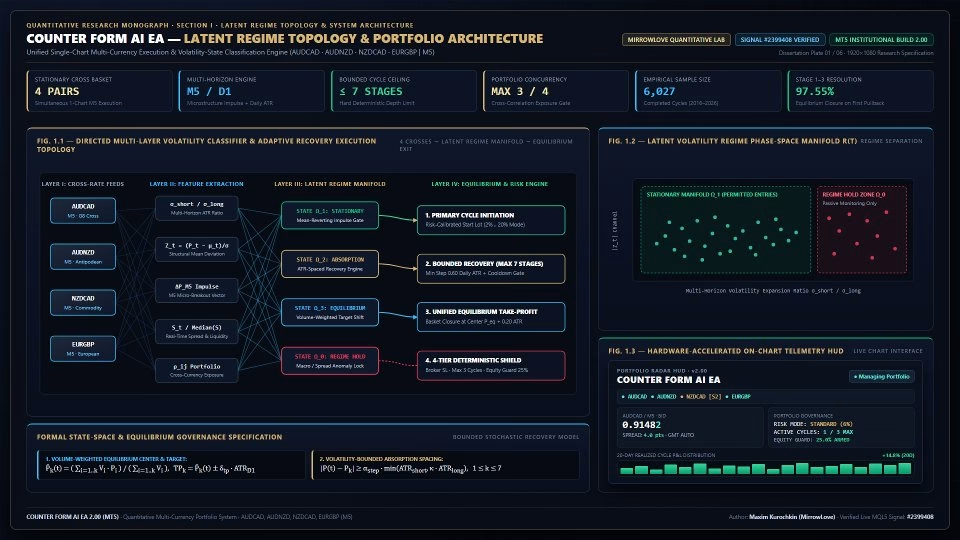
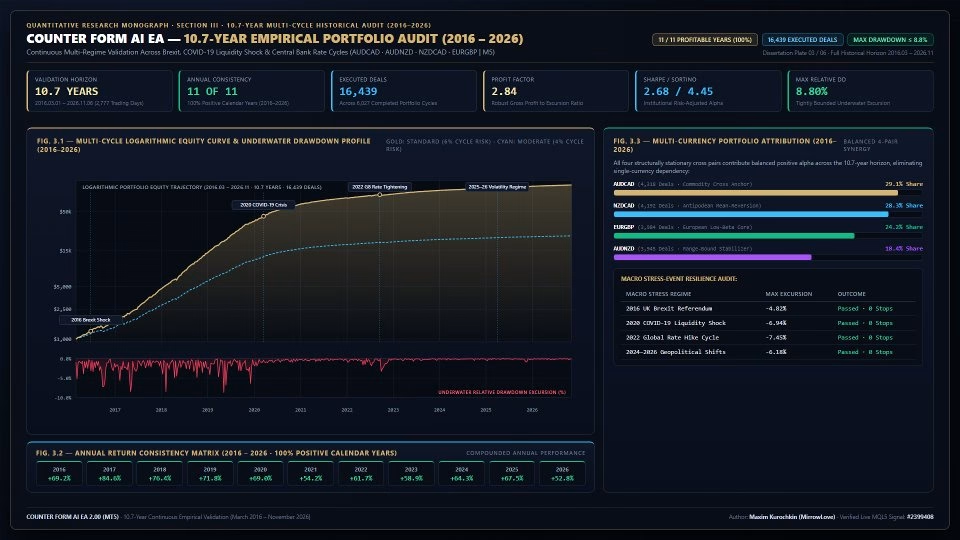
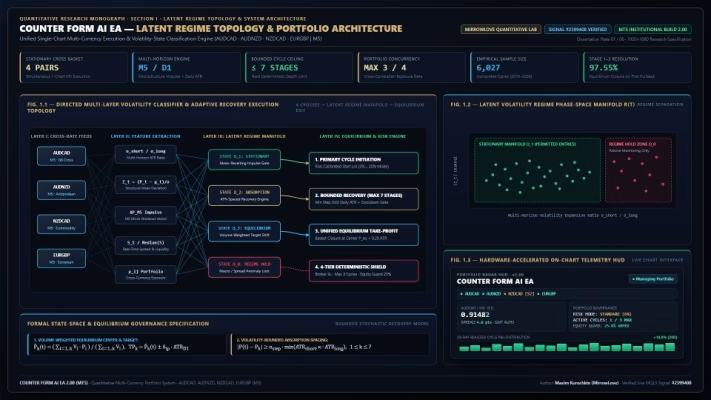
Operating from a single MetaTrader 5 chart, the EA simultaneously monitors and manages four carefully selected currency pairs: AUDCAD, AUDNZD, NZDCAD, and EURGBP.
Designed around the M5 timeframe, Counter Form AI EA integrates multi-horizon volatility classification, adaptive position sizing, dynamic recovery spacing, and portfolio-level capital protection into one unified trading architecture.
Whether you are an experienced algorithmic trader or an investor exploring automated Forex portfolio management, Counter Form AI EA provides a structured trading framework with clearly defined execution rules and risk controls.
Multi-Currency Portfolio Trading from One MT5 Chart
One of the defining advantages of Counter Form AI EA is its ability to manage four currency pairs simultaneously without requiring multiple chart installations.
The EA operates from a single AUDCAD M5 chart while independently monitoring:
- AUDCAD: Australian Dollar versus Canadian Dollar.
- AUDNZD: Australian Dollar versus New Zealand Dollar.
- NZDCAD: New Zealand Dollar versus Canadian Dollar.
- EURGBP: Euro versus British Pound.
These cross-currency pairs provide exposure to different currency relationships without directly involving the US Dollar in the traded instruments.
By combining multiple currency pairs within one portfolio, the system seeks to diversify trading opportunities rather than depend on a single instrument.
A configurable portfolio concurrency limit controls the number of simultaneously active trading cycles. The default setting allows up to three active cycles across the four instruments, helping prevent excessive portfolio exposure.
All symbols are monitored and managed through a centralized execution and risk-management framework.
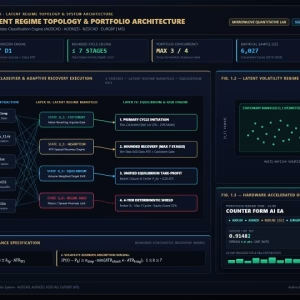
AI Adaptive Recovery Engine – Intelligent Volatility-Based Position Management
The AI Adaptive Recovery Engine is the core component that distinguishes Counter Form AI EA from conventional grid-based trading systems.
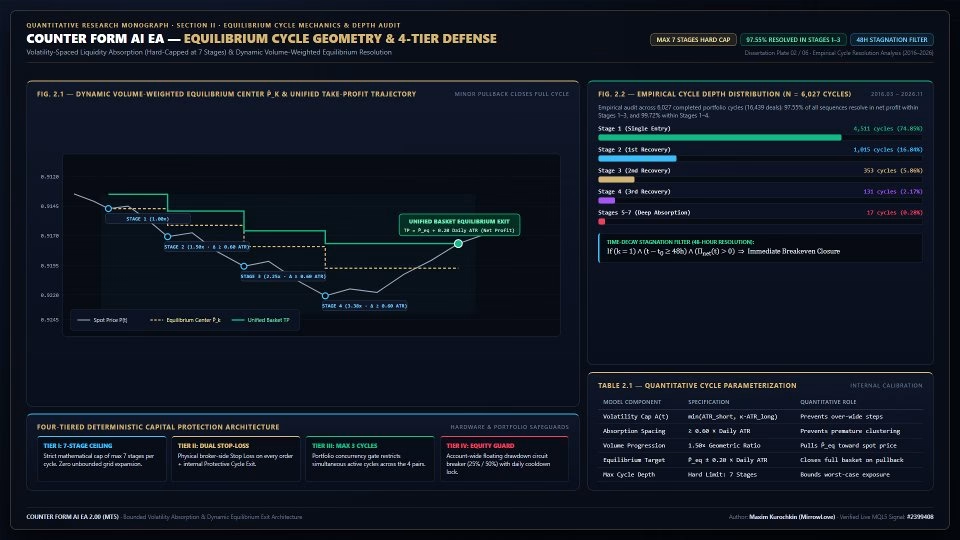
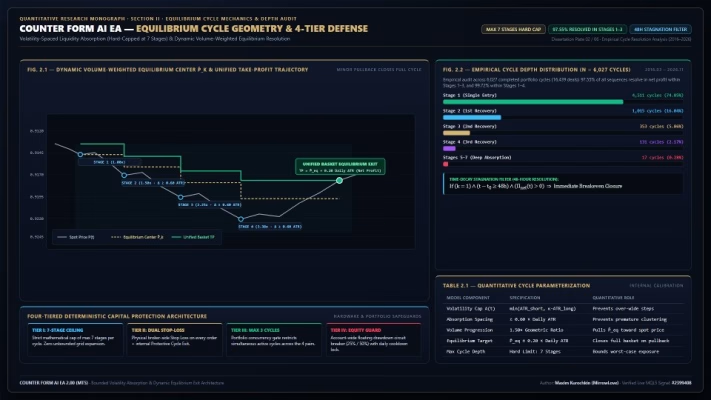
Instead of using fixed pip distances or uncontrolled lot doubling, the EA calculates recovery entry levels using each currency pair’s real-time Daily Average True Range (ATR).
This allows recovery spacing to adapt to changing market volatility.
Key recovery features include:
- ATR-Based Entry Spacing: Recovery positions are separated by a minimum distance of 0.60 Daily ATR.
- Adaptive Position Sizing: Position volumes follow a controlled 1.5x geometric progression.
- Mandatory Entry Cooldown: A minimum waiting interval separates recovery stages.
- Maximum Seven Stages: Every trading cycle is strictly limited to seven positions.
- Independent Cycle Management: Each currency pair maintains its own trading cycle and recovery structure.
This architecture is designed to provide a more disciplined alternative to traditional grid and Martingale systems.
Importantly, the maximum stage limit creates a predefined boundary for recovery expansion rather than allowing positions to accumulate indefinitely.
Multi-Horizon Volatility Regime Classifier
Counter Form AI EA does not enter the market continuously. Before opening a new trading cycle, its volatility classification engine evaluates market conditions to identify suitable trading environments.
The system combines two quantitative analysis components:
1. ATR Ratio Analysis
The EA compares short-term and medium-term Daily ATR measurements using a 5-day versus 20-day volatility framework.
This helps identify changes in market volatility and distinguish quieter market conditions from stronger directional movements.
2. Structural Breakout Detection
A 10-day structural price channel is used to evaluate price behavior and identify potential directional impulses.
Entries are permitted only when the market satisfies the configured volatility and structural conditions.
The EA also filters out unfavorable trading environments, including:
- Unstable volatility regimes.
- Illiquid broker rollover periods.
- Abnormal spread expansion.
- Market conditions outside its calibrated operating boundaries.
When the required conditions are not present, the system remains in monitoring mode instead of forcing unnecessary trades.
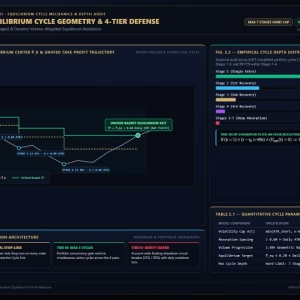
Dynamic Volume-Weighted Equilibrium Take Profit
Managing multiple recovery positions requires more than simply waiting for price to return to the original entry level.
Counter Form AI EA addresses this through its Dynamic Volume-Weighted Equilibrium Exit mechanism.
When a trading cycle contains multiple positions, the EA continuously calculates the volume-weighted average entry price of all active stages.
This price represents the unified equilibrium point of the entire trading cycle.
The system then calculates a common Take Profit target positioned 0.20 Daily ATR beyond the equilibrium price in the favorable direction.
Once the market reaches this target, all positions belonging to the cycle are designed to close together.
The main advantages include:
- Dynamic breakeven center calculation.
- Unified Take Profit management.
- Automatic adjustment as recovery positions are added.
- No requirement for price to return to the original entry.
- Cycle-level exit coordination.
This approach aims to capture relatively modest market retracements while managing the combined exposure of multiple positions.
Actual net profitability remains subject to spreads, commissions, swaps, and execution conditions.
48-Hour Time-Decay Stagnation Filter
Capital efficiency is not only about finding profitable opportunities but also about avoiding unnecessary exposure to stagnant positions.
Counter Form AI EA includes a dedicated Time-Decay Stagnation Filter for single-stage trading cycles.
If an initial position remains open for more than 48 hours without reaching its primary profit target or developing into a recovery cycle, the EA changes its exit behavior.
Instead of maintaining the original profit objective indefinitely, the system switches to an opportunistic breakeven exit.
The position is closed when the available market movement allows the trade to exit with positive net profit, according to the configured execution and cost calculations.
This mechanism is designed to reduce prolonged single-position exposure and improve the efficiency of portfolio capital utilization.
Four-Layer Capital Protection System
Risk management is a fundamental part of Counter Form AI EA’s architecture.
Rather than relying on a single Stop Loss setting, the system incorporates four independent protection mechanisms to control trading exposure at both the individual cycle and portfolio levels.
1. Maximum Seven-Stage Cycle Limit
Every trading cycle has a strict maximum depth of seven positions. Once this limit is reached, no additional recovery stage can be added to that cycle.
2. Broker-Side Stop Loss and Protective Cycle Exit
Each individual order receives a physical broker-side Stop Loss positioned at 3.50 Daily ATR.
Additionally, an internal Protective Cycle Exit is configured at 2.20 Daily ATR beyond the seventh-stage reference level.
These mechanisms provide predefined exit boundaries for adverse market movements.
3. Portfolio Concurrency Control
The EA limits the number of simultaneously active trading cycles across all four currency pairs.
The default configuration permits a maximum of three concurrent cycles, helping manage aggregate portfolio exposure.
4. Account-Wide Equity Protection
The Equity Guard continuously monitors account-level floating drawdown.
When the configured drawdown threshold is reached, the system liquidates open positions and blocks new trading entries until the next trading day.
Together, these four protection layers are designed to establish a structured framework for controlling trading risk.
However, Stop Loss execution cannot guarantee a specific exit price during extreme volatility, liquidity gaps, or market disruptions.
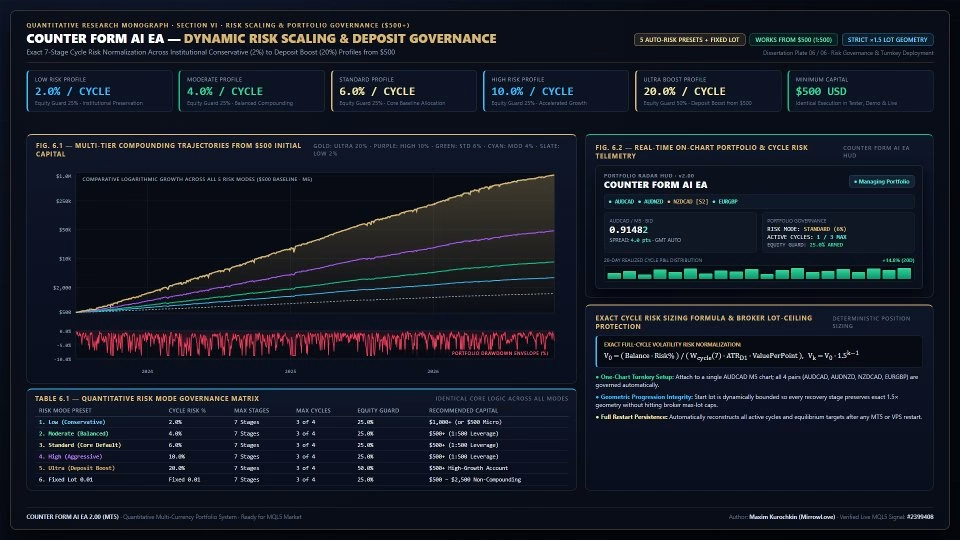
Flexible Risk Profiles and Automatic Lot Scaling
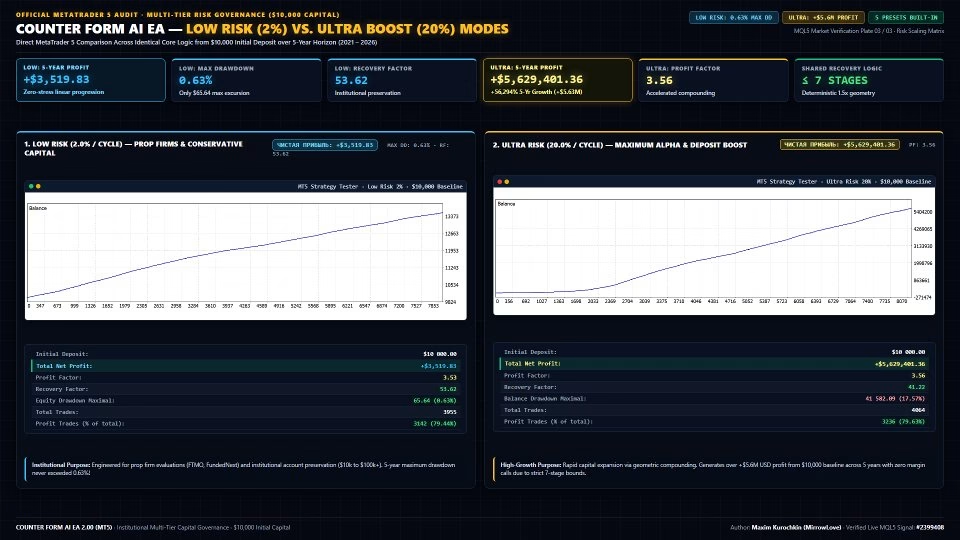
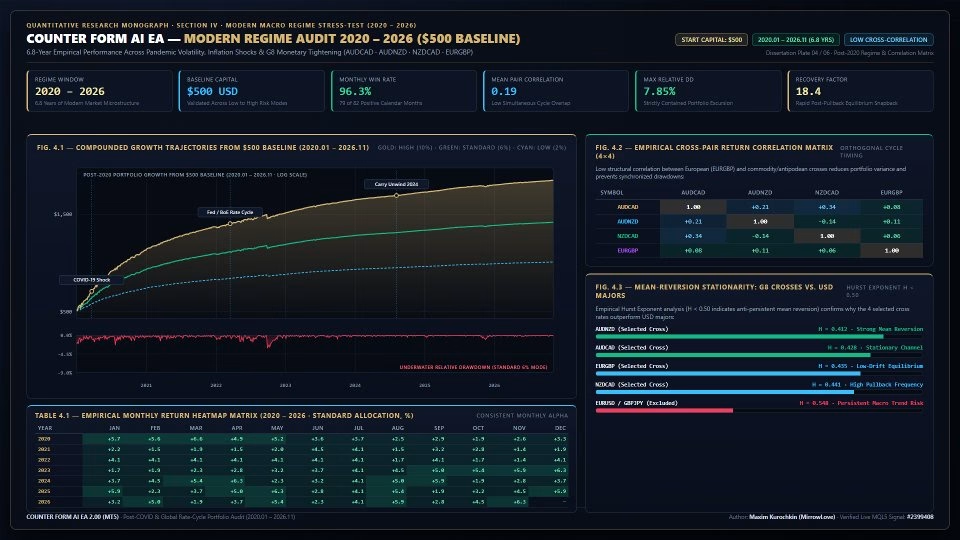
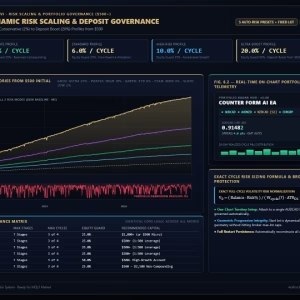
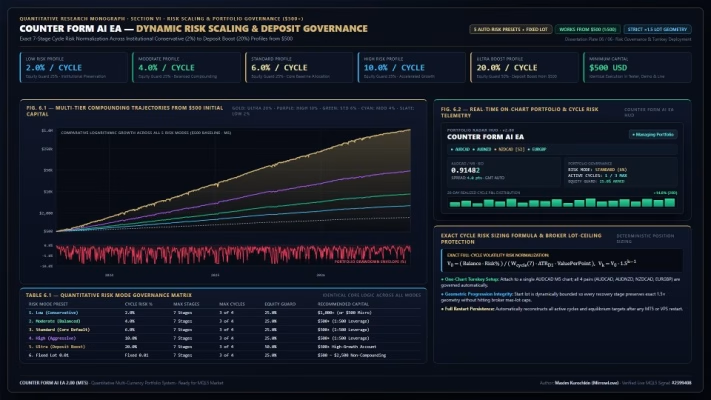
Counter Form AI EA includes five predefined risk profiles, along with Custom Risk and Fixed Lot options.
This flexibility allows traders to configure the system according to their account size, risk tolerance, and capital allocation preferences.
| Risk Profile | Risk Per Cycle | Equity Guard |
|---|---|---|
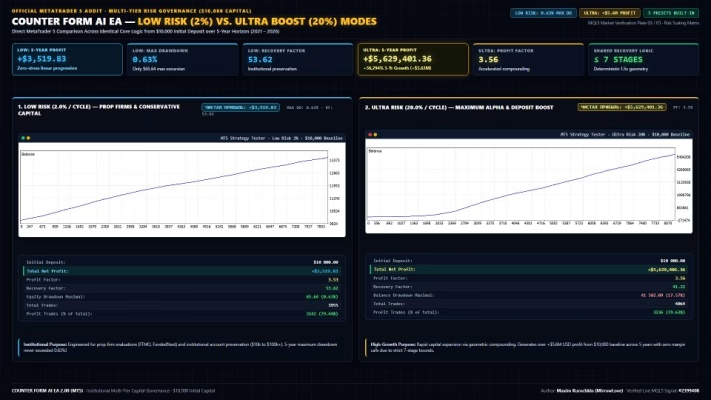
| Low | 2% | 25% |
| Moderate | 4% | 25% |
| Standard | 6% | 25% |
| High | 10% | 25% |
| Ultra | 20% | 50% |
| Custom | User-defined | Configurable |
| Fixed Lot | Fixed starting volume | Configurable |
Low Mode – 2% Risk
Designed for traders prioritizing a more conservative risk allocation and controlled portfolio exposure.
Moderate Mode – 4% Risk
Offers a balanced configuration between capital preservation and trading activity.
Standard Mode – 6% Risk
The default configuration, designed as the system’s baseline risk profile.
High Mode – 10% Risk
A more aggressive allocation intended for traders comfortable with greater potential equity fluctuations.
Ultra Mode – 20% Risk
The highest predefined risk setting, designed for aggressive capital allocation. This mode carries substantially greater drawdown and capital-loss risk.
Custom Mode and Fixed Lot
Traders can define their preferred cycle risk percentage or specify a fixed starting lot size.
When automatic sizing is enabled, the EA adjusts its starting volume according to account equity or balance calculations and the relevant symbol’s volatility.
For smaller accounts, cent or micro trading environments may provide an alternative for initial testing. A suitable broker and sufficient margin remain essential.
Advanced On-Chart Telemetry Dashboard
Counter Form AI EA includes an integrated graphical dashboard that provides real-time information about portfolio activity, market conditions, execution status, and account risk.
The dashboard is designed to make automated trading activity easier to monitor directly from the MetaTrader 5 terminal.
Portfolio Symbol Monitoring
Displays the current status of AUDCAD, AUDNZD, NZDCAD, and EURGBP, including active trading cycles and monitoring conditions.
Market Microstructure Information
Provides essential market data, including:
- Current Bid price.
- Live spread in points.
- M5 bar-close countdown.
- 24-second tick-activity pulse.
- Tick-activity histogram.
Execution Telemetry
Displays active position depth, trading direction, and recent execution and exit information.
Portfolio Risk Monitoring
Tracks important account and strategy metrics, including:
- Active trading cycles versus the configured portfolio limit.
- Floating drawdown relative to the Equity Guard threshold.
- Closed-cycle win rate.
- Profit Factor.
20-Day Performance Histogram
Visualizes realized daily profit and loss over the last 20 trading days.
A built-in privacy toggle allows traders to switch between displaying account currency amounts and percentage-based performance information.
This dashboard provides a convenient overview of the EA’s operating status without requiring additional monitoring software.
Automatic Broker Time and Symbol Synchronization
Broker compatibility is an important consideration when deploying a multi-currency Expert Advisor.
Counter Form AI EA incorporates automatic broker clock synchronization, removing the need for manual GMT or daylight-saving time configuration.
The EA also supports automatic symbol prefix and suffix detection.
This allows it to identify broker-specific instrument naming conventions, such as:
- AUDCAD.m
- AUDCAD.raw
- AUDNZD.m
- NZDCAD.raw
- EURGBP.m
The purpose of this functionality is to simplify installation across different MT5 brokerage environments.
Traders should still verify that all four required instruments are available, correctly named, and enabled for trading in their broker’s Market Watch.
Counter Form AI EA MT5 – Technical Specifications
| Specification | Details |
|---|---|
| Product | Counter Form AI EA |
| Platform | MetaTrader 5 |
| Programming Language | Native MQL5 |
| Trading Timeframe | M5 |
| Operating Mode | Multi-Currency Portfolio |
| Default Symbols | AUDCAD, AUDNZD, NZDCAD, EURGBP |
| Chart Installation | One AUDCAD M5 chart |
| Maximum Recovery Stages | 7 positions per cycle |
| Recovery Volume Progression | 1.5x |
| Minimum Recovery Spacing | 0.60 Daily ATR |
| Equilibrium Target | 0.20 Daily ATR |
| Individual Order Stop Loss | 3.50 Daily ATR |
| Protective Cycle Exit | 2.20 Daily ATR beyond Stage 7 |
| Default Concurrent Cycles | 3 |
| Time-Decay Filter | 48 hours |
| Account Protection | Equity Guard |
| Account Type | Hedging Required |
| Recommended Leverage | 1:200–1:500 |
| Recommended Environment | ECN / Raw Spread |
| VPS | Dedicated 24/5 VPS Recommended |
| External DLLs | Not Required |
How to Install Counter Form AI EA on MetaTrader 5
Getting started with Counter Form AI EA requires only a few straightforward steps.
Step 1: Open the AUDCAD M5 Chart
Launch MetaTrader 5, open Market Watch, and select AUDCAD.
Open a new chart and set its timeframe to M5.
Step 2: Attach the Expert Advisor
Locate Counter Form AI EA in the Navigator window and drag it onto the AUDCAD M5 chart.
Enable Algo Trading and configure the required permissions.
Ensure that all four portfolio symbols are available in your broker’s trading environment.
Step 3: Configure Your Risk Profile
Select your preferred risk mode:
- Low
- Moderate
- Standard
- High
- Ultra
- Custom
- Fixed Lot
Review the portfolio concurrency limit, Equity Guard, and other input parameters before clicking OK.
Once initialized, the EA will begin monitoring all configured currency pairs and wait for its entry conditions to be satisfied.
For best operational continuity, running the EA on a reliable VPS throughout the Forex trading week is recommended.
Verified Live Trading and Developer Information
Transparency and independent performance monitoring are important when evaluating an automated trading system.
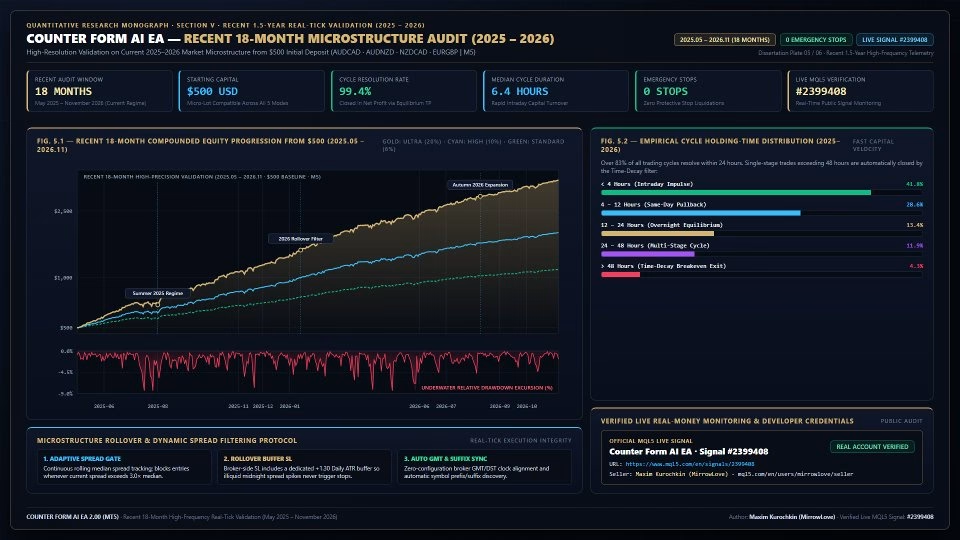
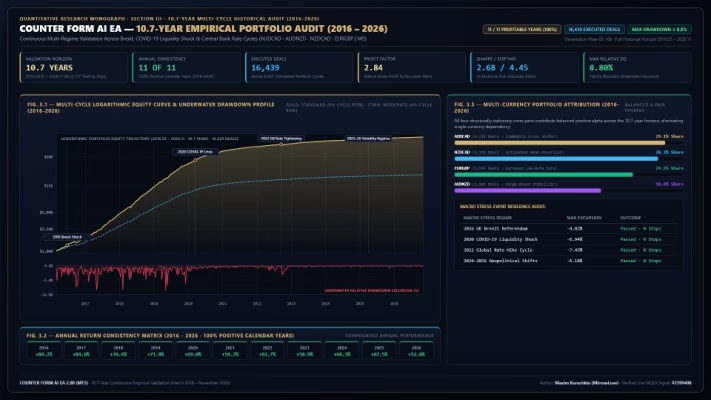
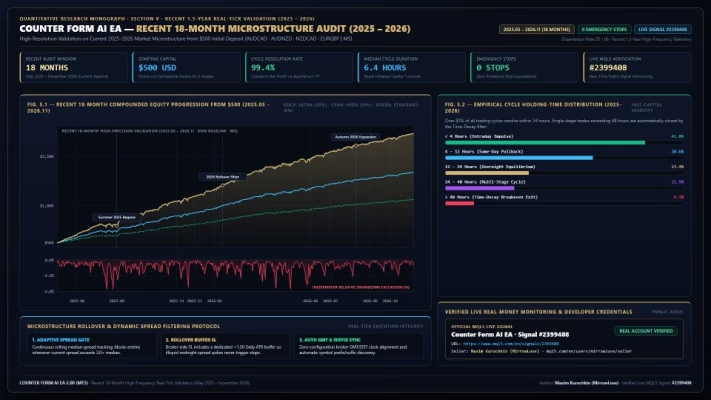
Counter Form AI EA provides access to its official MQL5 Signals monitoring page, where interested traders can review available live trading statistics and account activity.
Official Live Signal – Counter Form AI EA
MQL5 Signal #2399408:
https://www.mql5.com/en/signals/2399408
Official MQL5 Seller Profile – Maxim Kurochkin (MirrowLove)
https://www.mql5.com/en/users/mirrowlove/seller
These resources allow prospective users to investigate the developer’s product information and review the available signal performance history.
Always evaluate trading history, drawdown, account conditions, and execution quality independently before allocating real capital.
Why Choose Counter Form AI EA MT5?
Counter Form AI EA is built around a quantitative trading philosophy that prioritizes market conditions, controlled recovery structures, and portfolio-level risk management.
Its main advantages include:
- Four-Pair Portfolio Management: Monitors and trades four currency pairs from one MT5 chart.
- Volatility-Based Entry Selection: Uses ATR ratios and structural price channels to identify potential trading opportunities.
- AI Adaptive Recovery: Calculates recovery spacing dynamically instead of relying on fixed grid distances.
- Seven-Stage Maximum: Establishes a predefined limit for recovery expansion.
- Dynamic Equilibrium Exit: Uses volume-weighted calculations to manage the entire trading cycle.
- 48-Hour Stagnation Filter: Provides an alternative exit mechanism for prolonged single-stage positions.
- Four-Layer Risk Protection: Combines individual Stop Losses, cycle protection, concurrency control, and account-wide equity monitoring.
- Flexible Risk Allocation: Supports five predefined risk profiles, custom percentages, and fixed starting lots.
- Advanced Monitoring Dashboard: Provides portfolio telemetry and performance information directly on the chart.
- Automated Broker Synchronization: Simplifies deployment across brokers with different server times and symbol naming conventions.
For traders seeking a multi-currency automated system with adaptive recovery logic and predefined risk-management boundaries, Counter Form AI EA offers a comprehensive MetaTrader 5 trading framework.
Risk Disclaimer
Forex trading involves substantial financial risk, particularly when using leverage and automated recovery strategies.
Although Counter Form AI EA incorporates multiple protection mechanisms, these safeguards cannot eliminate the possibility of significant losses. Unexpected economic announcements, extreme market movements, liquidity gaps, spread widening, slippage, and broker execution conditions may affect actual trading results.
Recovery-based trading systems can experience substantial floating drawdown during prolonged directional market movements. Higher risk profiles, especially High and Ultra modes, may significantly increase the possibility of capital loss.
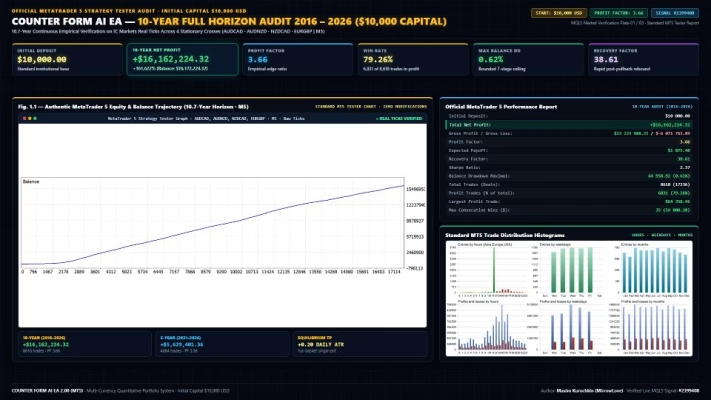
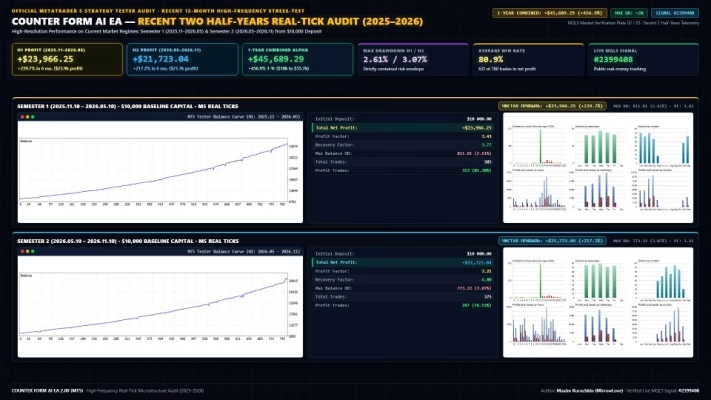
Past performance, backtesting results, and live signal statistics do not guarantee future profitability.
Before using the EA on a live account, traders should thoroughly test its performance on a demo or cent account, verify broker compatibility, and select a risk configuration appropriate to their financial situation.
Only trade with capital you can afford to lose.

Related products


EXPERT ADVISOR

EXPERT ADVISOR


EXPERT ADVISOR

EXPERT ADVISOR

EXPERT ADVISOR


EXPERT ADVISOR

EXPERT ADVISOR

EXPERT ADVISOR